A 2.4GHz wall panel remote is a fixed wireless sender that commands a compatible cabinet lighting receiver. It can provide switching, dimming or color-temperature adjustment when the selected sender, receiver and fixtures support those functions.
Choose the confirmed sender/receiver combination first. Then check the lighting output type, control mapping, receiver load, published range and operation in the finished cabinet.
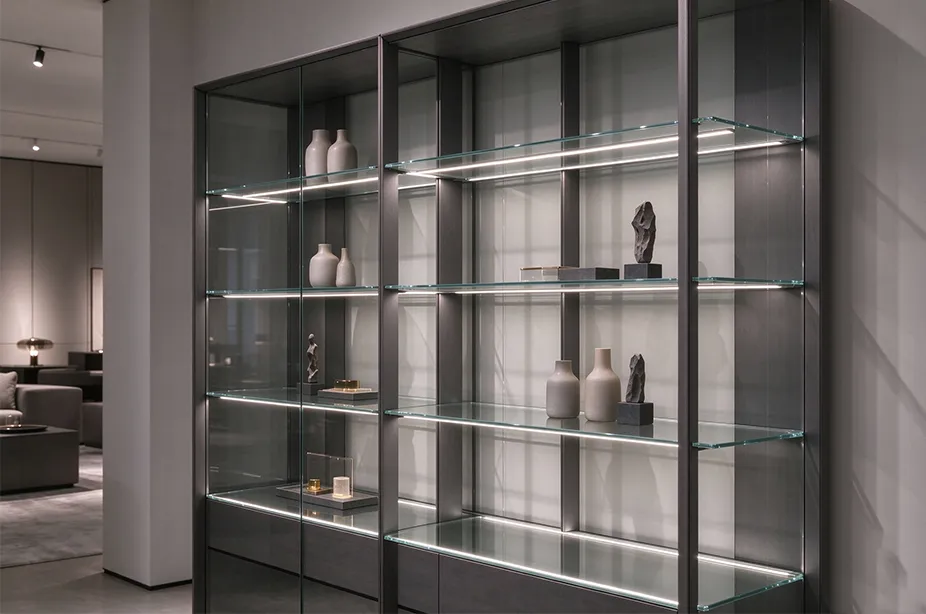
A wall-mounted panel gives users a control in a consistent position. It is especially useful when they need manual control of shelf, display or cabinet lights without routing a control cable to that wall position. The lights still need their own correctly specified power circuit.
For an overview of how fixtures, power supplies and controls work together, see the integrated cabinet lighting system overview.
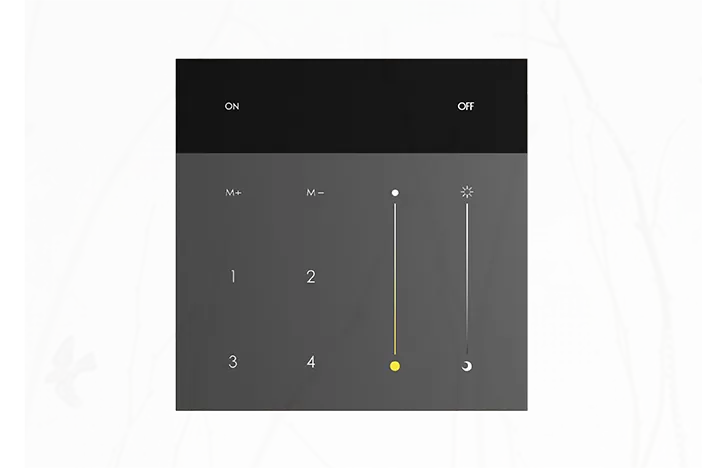
ARTCILUX AS3539 is a battery-powered wall panel sender. Confirm the receiver and function mapping for the selected lighting configuration.
Start with the lighting function and the receiver
Write down what the user should be able to change. Switching a single-color light, dimming it and adjusting a tunable-white fixture are different requirements. A panel with more buttons cannot add a lighting function that the receiver and fixtures do not support.
| Lighting requirement | What the system must support | What to confirm |
|---|
| Single-color switching and dimming | A suitable single-color fixture and compatible receiver output. | Brightness control, on/off behavior, load limits and the confirmed panel pairing. |
| Tunable-white / CCT adjustment | A fixture and receiver arrangement designed for color-temperature control. | Supported channels, wiring, CCT adjustment and whether brightness remains controllable. |
| Independent groups of lights | A compatible grouping or zone arrangement. | Which control operates each receiver and whether one group can change without affecting another. |
| RGB or RGBW control | A specifically supported color-control system. | Explicit support from the sender, receiver and fixture; do not infer it from a CCT feature. |
Matching the 2.4GHz frequency is not enough. Products must also use a compatible protocol and pairing arrangement. The same band does not establish interoperability with a different brand, Wi-Fi control, a Matter network or a phone app.
Confirm the exact ordered combination with the supplier, including firmware or configuration where relevant. Use the specified pairing instructions rather than borrowing a button sequence from another panel model.
Example: two lighting groups in one kitchen
Define Group A as under-cabinet task lights and Group B as display-cabinet lights. Changing A should leave B unchanged. Ask which panel keys control each group, how many receivers are required, and whether brightness and CCT commands act on one group or both.
If door sensors are included, decide how a door event should interact with manual control. Confirm that behavior on the assembled sample before approving the control configuration.
AS3539 wall panel: published specifications
The AS3539 product page describes single-color and tunable-white control options through compatible receivers. Its published sender parameters are:
Sender specifications are separate from receiver load specifications| Parameter | Published value | Selection implication |
|---|
| Dimensions | 86 x 86 x 12mm | Check the mounting location and any required mounting accessory. |
| Power | 3.0-3.3V; CR2450 battery | Plan battery access and use the specified replacement type. |
| Wireless method | 2.4GHz GFSK | Confirm protocol compatibility and the approved receiver combination. |
| Remote-control distance | 6m | Assess the actual path from the wall position to the installed receiver. |
| Operating consumption | Less than 60mW | This is a consumption specification, not a promised battery lifetime. |
| Operating temperature | -20 to 50 degrees C | Check the conditions at the panel location. |
The panel has four independent control keys. Confirm how they map to receivers or groups in the supplied configuration. A key count alone does not prove a particular four-zone layout, maximum receiver count or scene function.
For a commercial project, obtain target-market compliance documentation for the exact sender and receiver supplied. For EU projects, the European Commission's Radio Equipment Directive overview explains the regulatory framework for radio equipment. Confirm the requirements for the actual product configuration.
Also confirm whether the required behavior includes brightness memory, a default state after mains power returns, or coordinated control from several senders. Request documentation for those functions before making them part of the project specification.
Check the receiver output and load limits
The wall panel sends commands; it does not supply power to the lights. Check whether the selected receiver switches the LED load directly or provides a control signal for a compatible driver. That distinction determines which current and power limits apply to the connections.
| System part | Its role | Checks that belong to this part |
|---|
| Wall panel sender | Transmit the requested lighting command. | Battery, mounting, supported commands, pairing and usable range. |
| LED driver | Provide the electrical supply specified by the lighting system. | Mains input, output voltage and type, load and installation conditions. |
| Receiver / controller | Receive commands and control the LED load or provide a control signal, as specified for the model. | Approved sender pairing, channel functions, fixture compatibility and load limits. |
| LED fixtures | Produce light in response to the controlled supply. | Rated input, power, channels, mounting and light appearance. |
The AS3539 product page lists S1015H for single-color dimming and switching, and S1015D for brightness and color-temperature control. Confirm the exact wiring and operating limits of the selected combination.
| Receiver listing | Published electrical information | What to verify for the project |
|---|
| S1015H | 12V/24V; listed load power 60W; dimming and switching. | The exact voltage, load conditions, connector limits and approved sender pairing. |
| S1015D | 12V/24V; listed PWM output signal at 240Hz; no fixed wattage rating stated. | The required driver interface, output connections, permitted load and supported lighting functions. |
A driver's available power cannot override a lower receiver or connector rating. For supply selection, see the 12V vs 24V LED driver guide. Use the product-specific instructions for the actual power and control connections.
Check wireless range in the finished furniture
AS3539 lists a 6m remote-control distance. A range value published for a different receiver or sender should not be substituted for that specification. Furniture materials, receiver position and obstacles can affect operation.
Test the intended wall position: use the real distance and direction to each receiver.
Close the furniture: repeat the test with doors closed and the components in their planned enclosures.
Check metal and dense obstacles: evaluate the assembled location rather than relying only on an open-bench test.
Keep components accessible: allow future battery replacement, receiver servicing and any pairing procedure.
If control is unreliable, first check the specified battery, confirmed pairing and model-specific instructions. Then test a permitted alternative receiver position. Do not promise a longer range than the published sender specification.
A practical acceptance test before production
Record the panel, receiver, driver and fixture models in the sample bill of materials. Confirm the electrical load and the approved combination before conducting functional tests.
Pair using the supplier's instructions. Identify which panel control should operate each receiver.
Test every required function. Check switching and dimming, and test color-temperature adjustment only where the selected system supports it.
Check group behavior. Operate each intended group and verify that unrelated lights remain in the expected state.
Repeat in the installed positions. Test at the intended operating distance with the cabinet assembled and doors closed.
Cycle the lighting supply. Record restart and control behavior after mains power returns, then compare it with the project requirement.
Confirm service access. Check that the battery can be replaced and the receiver can be reached using the documented procedure.
Agree on the acceptance result with the supplier. Retain the connection instructions and group mapping with the cabinet assembly documentation so the production team can reproduce the tested configuration.
Troubleshooting a panel-controlled cabinet system
| Observed behavior | What to check |
|---|
| No response to the panel | Battery type and condition, receiver power, documented pairing and approved model compatibility. |
| Switching works but dimming does not | The selected receiver output, fixture dimming support and configuration for that function. |
| Brightness changes but CCT does not | Tunable-white fixture and receiver support, channel connections and required control mapping. |
| The wrong lights respond | Receiver assignment, group mapping and any shared pairing retained from earlier tests. |
| Response changes after installation | Operating distance, obstacles, receiver position, battery and the assembled furniture conditions. |
Questions about 2.4GHz cabinet wall panels
Does AS3539 power the cabinet lights?
No. It is a battery-powered sender. The lights require a compatible driver and receiver or controller arrangement with the appropriate electrical ratings.
Does a 2.4GHz panel use Wi-Fi?
The frequency alone does not establish Wi-Fi capability. AS3539 lists a 2.4GHz GFSK wireless method. Confirm any app, gateway or network support separately for the exact system.
Can I pair it with any 2.4GHz receiver?
No. Obtain confirmation of the specific sender/receiver combination and required functions. Matching frequency and supply voltage does not establish protocol compatibility.
Can one panel control several lighting groups?
Use a combination documented to support the required grouping. Confirm the key-to-group assignment and any limits on receivers or senders for that configuration.
Can the panel work alongside door sensors?
Only when the selected control arrangement supports both. Specify how manual commands and door events should interact, then verify that behavior on the assembled sample.
Product references: AS3539 sender, S1015H receiver and S1015D receiver. Confirm the ordered configuration against current supplier documentation.